How To Create A Secure Digital Signature Online
Digital documents have become a standard part of personal and business communication. Contracts, invoices, legal agreements, tax forms, employment documents, and many other records are now shared electronically. As businesses continue moving toward paperless workflows, secure digital signatures have become an essential tool for verifying identity and protecting document integrity.
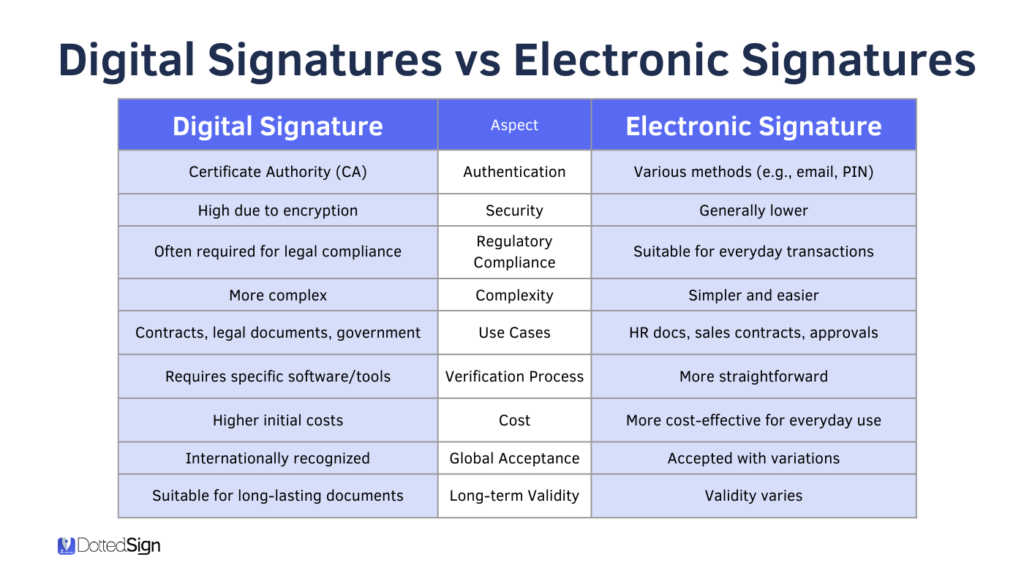
A secure digital signature allows you to sign documents online while ensuring that the document remains authentic and unchanged after signing. Unlike a simple electronic signature, a digital signature uses encryption and digital certificates to provide a higher level of security.
This guide explains how to create a secure digital signature online, the tools you need, best security practices, legal considerations, and common mistakes to avoid.
What Is A Secure Digital Signature?
A secure digital signature is an electronic signature protected by cryptographic technology.
It confirms three important things:
- The identity of the signer
- The authenticity of the document
- That the document has not been modified after signing
Digital signatures rely on encryption technology rather than simply inserting an image of a handwritten signature.
Why Use A Digital Signature?
Digital signatures provide several important benefits for individuals and businesses.
They help you:
- Sign documents remotely
- Reduce paperwork
- Improve document security
- Save time
- Reduce printing costs
- Speed up approvals
- Protect confidential information
- Verify document authenticity
Organizations of every size now use digital signatures for daily operations.
Documents You Can Sign Online
Digital signatures work with many document types.
Examples include:
- Business contracts
- Employment agreements
- Tax documents
- Purchase orders
- Financial forms
- Healthcare records
- Government applications
- Rental agreements
- Service contracts
- Non-disclosure agreements
Most digital signature platforms support PDF and Microsoft Office documents.
What You Need Before Creating A Digital Signature
Before signing documents online, prepare the following:
- A computer, tablet, or smartphone
- Internet connection
- Digital signature software or service
- Valid email address
- Identity verification documents if required
- The document you want to sign
Some providers may request additional identity verification before issuing a digital certificate.
Step 1: Choose A Trusted Digital Signature Platform
The first step is selecting a trusted provider.
A reliable platform should offer:
- Strong encryption
- Digital certificates
- Identity verification
- Audit logs
- Secure cloud storage
- Multi-factor authentication
- Compliance with electronic signature laws
Choosing a reputable provider helps protect your documents from unauthorized access.
Step 2: Create Your Account
Register with the chosen digital signature service.
Most providers require:
- Full name
- Email address
- Password
- Phone verification
Some business accounts may require additional company information.
Always create a strong password and enable multi-factor authentication if available.
Step 3: Verify Your Identity
Certain digital signature providers verify your identity before issuing a digital certificate.
Verification may include:
- Government-issued ID
- Passport
- Driver’s license
- Video verification
- Email confirmation
- Phone verification
Identity verification helps prevent fraud.
Step 4: Upload Your Document
After logging into your account, upload the document you want to sign.
Supported formats often include:
- DOCX
- XLSX
- PPTX
Most users sign PDF documents because they preserve formatting across devices.
Step 5: Add Signature Fields
Place the signature field where the signature should appear.
Many platforms also allow additional fields such as:
- Date
- Initials
- Name
- Company
- Job title
- Checkboxes
- Text fields
This makes document completion easier for all parties.
Step 6: Apply Your Digital Signature
Select your digital certificate.
The software creates an encrypted digital signature using your private key.
This signature is attached securely to the document.
Once completed, the document cannot be modified without invalidating the signature.
Step 7: Save And Share The Document
Save the signed document.
Most platforms allow you to:
- Download the file
- Email the document
- Share secure links
- Store documents in the cloud
- Send to additional signers
Recipients can verify the signature using compatible PDF readers or verification software.
How Digital Signature Verification Works
Every digitally signed document contains an encrypted fingerprint known as a hash.
When someone opens the document:
- The software generates a new hash.
- It decrypts the original hash using the public key.
- It compares both values.
If both values match, the document remains authentic.
If they differ, the software warns that changes have been made.
Tips For Creating A Secure Digital Signature
Follow these best practices.
Use Trusted Providers
Always choose reputable digital signature services.
Protect Your Private Key
Never share your private key with anyone.
Enable Multi-Factor Authentication
Use two-factor authentication to protect your account.
Update Your Software
Install software updates regularly.
Verify Certificates
Confirm digital certificates before trusting signed documents.
Use Strong Passwords
Create long passwords containing letters, numbers, and symbols.
Backup Important Documents
Store signed documents in secure locations.
Monitor Account Activity
Review account access for unusual activity.
Common Mistakes To Avoid
Many users reduce document security by making avoidable mistakes.
Do not:
- Share signing credentials.
- Use weak passwords.
- Ignore certificate warnings.
- Sign documents from unsecured public computers.
- Store private keys in unsafe locations.
- Download software from unknown websites.
- Skip identity verification when required.
Avoiding these mistakes improves document security.
Benefits For Businesses
Businesses benefit from secure digital signatures in many ways.
They can:
- Reduce document processing time.
- Improve workflow efficiency.
- Lower operational costs.
- Support remote employees.
- Increase customer satisfaction.
- Improve compliance.
- Reduce paper storage.
- Maintain secure audit trails.
These advantages make digital signatures an important part of modern business operations.
Benefits For Individuals
Individuals also gain significant advantages.
Digital signatures help people:
- Sign documents from home.
- Complete applications quickly.
- Protect personal information.
- Save travel time.
- Reduce printing costs.
- Share documents securely.
- Access signed files from multiple devices.
This convenience supports both personal and professional activities.
Are Online Digital Signatures Safe?
Yes.
Digital signatures are considered one of the safest methods for signing electronic documents.
Security comes from:
- Encryption
- Public Key Infrastructure (PKI)
- Digital certificates
- Identity verification
- Tamper detection
- Secure audit logs
When used correctly, digital signatures provide stronger protection than handwritten signatures on paper.
Industries That Use Digital Signatures
Many industries rely on secure digital signatures.
These include:
- Banking
- Insurance
- Healthcare
- Government
- Real estate
- Education
- Legal services
- Information technology
- Manufacturing
- Human resources
Organizations use digital signatures to improve efficiency while protecting sensitive information.
Frequently Asked Questions
Can I create a digital signature for free?
Some providers offer free plans with limited features, while advanced security options may require a paid subscription.
Do I need special software?
Many cloud-based platforms allow you to create and verify digital signatures using a web browser without installing software.
Is a scanned handwritten signature a digital signature?
No. A scanned handwritten signature is generally considered an electronic signature, not a cryptographically secured digital signature.
Can digital signatures be verified?
Yes. Recipients can verify the authenticity of digitally signed documents using compatible software.
Can I sign documents from my phone?
Yes. Most modern digital signature platforms support Android and iPhone devices.
Conclusion
Creating a secure digital signature online is an effective way to sign documents while protecting their authenticity and integrity. By using trusted digital signature platforms, verifying your identity, safeguarding your private key, and following recommended security practices, you can complete personal and business transactions with confidence.
As organizations continue adopting digital workflows, secure digital signatures have become an essential part of document management. Whether you are signing contracts, financial records, legal agreements, or government forms, understanding how to create and use digital signatures helps improve security, reduce paperwork, and streamline document approval processes.



Post Comment