What Is A Digital Signature And How Does It Work

Digital technology has changed the way people create, send, and manage documents. Many organizations have replaced paper-based workflows with electronic processes that save time and reduce costs. One important part of this transformation is the digital signature.
A digital signature allows people and businesses to sign electronic documents while protecting their authenticity and integrity. It confirms who signed the document and helps detect whether the content has been changed after signing.
This guide explains what a digital signature is, how it works, why it is important, and how individuals and businesses can use it securely.
What Is A Digital Signature?
A digital signature is a cryptographic method used to verify the identity of the signer and ensure that a digital document has not been modified after it was signed.
Unlike a handwritten signature, a digital signature uses encryption technology to create a unique digital fingerprint for every signed document.
This fingerprint makes each signed file unique. If someone edits the document after signing, the signature becomes invalid, indicating that the content has changed.
Digital signatures are commonly used for:
Business contracts
Employment agreements
Government documents
Financial records
Tax forms
Medical documents
Legal agreements
Software distribution
Online applications
Why Digital Signatures Are Important
Businesses process thousands of documents every day. Printing, signing, scanning, and mailing paperwork takes time and increases operational costs.
Digital signatures help organizations by allowing documents to be signed electronically while maintaining security.
Some advantages include:
Faster document approval
Reduced paperwork
Lower printing costs
Improved document security
Easier remote collaboration
Better compliance
Faster customer service
Secure document storage
Individuals also benefit because they can sign documents from almost anywhere using a computer or smartphone.
How Does A Digital Signature Work?
Digital signatures rely on Public Key Infrastructure (PKI), encryption, and digital certificates.
The signing process follows several steps.
Step 1: Create The Document
A document is prepared in digital format.
Common file types include:
PDF
Word documents
Excel files
Contracts
Forms
Step 2: Generate A Hash Value
The signing software creates a mathematical representation of the document called a hash.
The hash is a short string of characters generated from the document’s contents.
Even changing a single letter in the document creates a completely different hash.
Step 3: Encrypt The Hash
The hash is encrypted using the signer’s private key.
This encrypted hash becomes the digital signature attached to the document.
Only the owner’s private key can create this signature.
Step 4: Attach The Signature
The encrypted signature and the digital certificate are attached to the document.
The recipient receives both together.
Step 5: Verify The Signature
When someone opens the signed document, the software:
Creates a new hash
Decrypts the original hash using the public key
Compares both values
If both hashes match, the document has not been altered.
If they do not match, the software warns that the document has been modified.
Understanding Public And Private Keys
Digital signatures depend on two encryption keys.
Private Key
The private key is secret.
Only the signer owns it.
It creates the digital signature.
Public Key
The public key is shared with others.
It verifies the signature but cannot create one.
Together these keys create a secure verification process.
What Is A Digital Certificate?
A digital certificate is an electronic credential that confirms the identity of the signer.
It contains information such as:
Name
Organization
Public key
Certificate issuer
Expiration date
Certificate serial number
Certificates are issued by trusted Certificate Authorities (CAs).
Examples include global certificate providers that verify identities before issuing certificates.
Features Of A Digital Signature
Digital signatures provide several important security features.
Authentication
Confirms who signed the document.
Integrity
Detects changes made after signing.
Non-Repudiation
Reduces the ability of a signer to deny signing the document.
Encryption
Protects sensitive information during verification.
Trust
Allows recipients to verify documents confidently.
Digital Signature Vs Handwritten Signature
A handwritten signature confirms that someone physically signed a document.
A digital signature goes much further by verifying identity and protecting the document from unauthorized changes.
Handwritten signatures can be copied or forged more easily.
Digital signatures use encryption, making them much more secure for electronic documents.
Common Uses Of Digital Signatures
Digital signatures are widely used across many industries.
Business Contracts
Companies sign agreements without printing paperwork.
Banking
Banks approve digital forms securely.
Government Services
Government agencies process applications electronically.
Healthcare
Hospitals protect patient records using digitally signed documents.
Legal Industry
Law firms exchange signed contracts securely.
Education
Universities issue certificates and academic documents.
Real Estate
Property agreements can be signed remotely.
Benefits Of Using Digital Signatures
Digital signatures provide several practical benefits.
Save Time
Documents can be signed within minutes.
Reduce Costs
Organizations spend less on paper, printing, storage, and shipping.
Improve Productivity
Employees spend less time managing paperwork.
Increase Security
Encryption protects documents from tampering.
Better Customer Experience
Customers can complete forms online instead of visiting offices.
Support Remote Work
Teams can approve documents from different locations.
Are Digital Signatures Legal?
Many countries recognize digital signatures as legally valid when they meet applicable legal requirements.
Examples include regulations in the United States, European Union, India, and many other regions that establish standards for electronic and digital signatures.
Businesses should ensure they use trusted digital signature platforms and comply with local laws before relying on digitally signed agreements.
How To Create A Digital Signature
Creating a digital signature is straightforward.
A typical process includes:
Choose a trusted digital signature service.
Create an account.
Verify your identity if required.
Upload your document.
Add signature fields.
Sign electronically.
Save the signed document.
Share it securely.
Most platforms also allow multiple people to sign the same document.
Tips For Using Digital Signatures Securely
To improve security:
Protect your private key.
Use strong passwords.
Enable multi-factor authentication.
Update signing software regularly.
Verify certificates before trusting signed documents.
Keep backup copies of important files.
Avoid sharing signing credentials.
Use trusted digital signature providers.
Common Myths About Digital Signatures
Myth 1: Digital Signatures Are Easy To Fake
Modern encryption makes digital signatures significantly harder to forge than handwritten signatures.
Myth 2: Only Large Companies Use Them
Businesses of every size use digital signatures.
Myth 3: They Are Difficult To Use
Many digital signature platforms provide simple, user-friendly interfaces.
Myth 4: They Are Only For Contracts
Digital signatures can be used for invoices, forms, approvals, applications, certificates, and many other document types.
Challenges Of Digital Signatures
Although digital signatures offer many advantages, users should understand a few challenges.
Certificate management requires attention.
Some industries have strict compliance requirements.
Users must protect their private keys carefully.
Software compatibility may vary between systems.
Proper planning and trusted software help reduce these challenges.
The Future Of Digital Signatures
As organizations continue adopting digital workflows, the use of digital signatures is expected to grow.
Artificial intelligence, cloud computing, blockchain, and automation are improving document management systems.
Businesses increasingly rely on secure digital transactions to reduce paperwork and improve operational efficiency.
Digital signatures are likely to become a standard part of online business, government services, financial transactions, and healthcare documentation.
Frequently Asked Questions
What is a digital signature?
A digital signature is a secure electronic method of verifying the identity of the signer and confirming that a document has not been altered after signing.
Is a digital signature the same as an electronic signature?
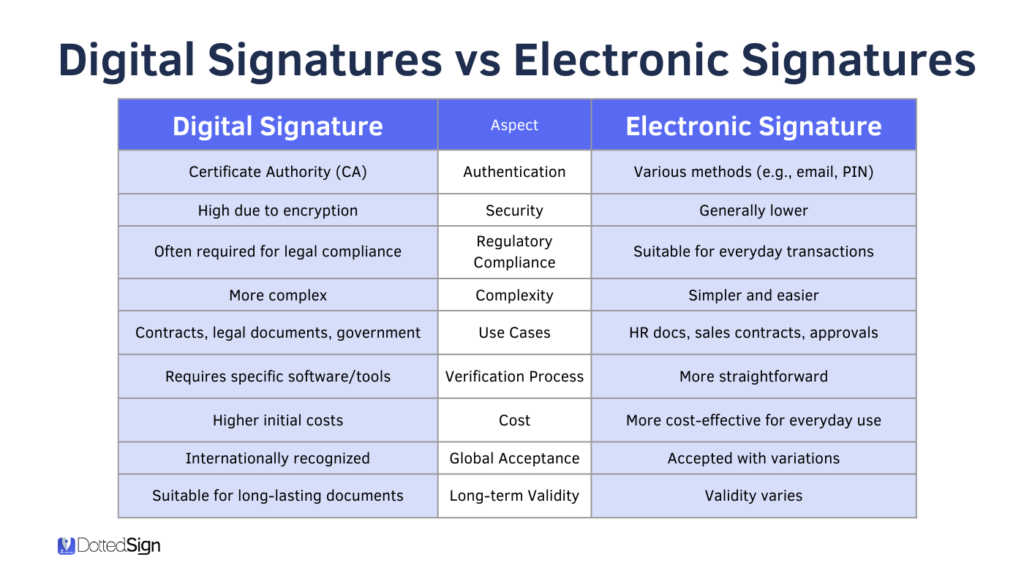
No. A digital signature uses encryption and digital certificates for security, while an electronic signature is a broader term for any electronic indication of agreement.
Are digital signatures secure?
Yes. They use encryption, private keys, public keys, and digital certificates to protect documents and verify authenticity.
Can digital signatures be used internationally?
Many countries legally recognize digital signatures, although requirements may vary by jurisdiction.
Do digital signatures expire?
The signature itself remains attached to the document, but the associated digital certificate may have an expiration date and renewal requirements.
Conclusion
Digital signatures have become an important part of modern document management. They provide a secure way to verify identity, protect document integrity, and streamline approval processes without relying on paper documents.
By using encryption, digital certificates, and Public Key Infrastructure, digital signatures help individuals and organizations complete transactions with greater confidence. Whether used for contracts, financial records, legal documents, healthcare forms, or government services, they reduce processing time, lower costs, and improve security.
As businesses continue moving toward digital operations, understanding how digital signatures work will help organizations and individuals adopt safer and more efficient document workflows.


Post Comment